Module API
py_trees
This is the top-level namespace of the py_trees package.
py_trees.behaviour
The core behaviour template for all py_tree behaviours.
- class py_trees.behaviour.Behaviour(name: str)
Bases:
ABCA parent class for all user definable tree behaviours.
- Args:
name: the behaviour name, defaults to auto-generating from the class name
- Raises:
TypeError: if the provided name is not a string
- Attributes:
- ~py_trees.behaviours.Behaviour.id (
uuid.UUID): automagically generated unique identifier for the behaviour
~py_trees.behaviours.Behaviour.name (
str): the behaviour name ~py_trees.behaviours.Behaviour.blackboards (typing.List[py_trees.blackboard.Client]): collection of attachedblackboard clients
- ~py_trees.behaviours.Behaviour.status (
Status): the behaviour status - ~py_trees.behaviours.Behaviour.parent (
Behaviour): a Compositeinstance if nested in a tree, otherwise None- ~py_trees.behaviours.Behaviour.children ([
Behaviour]): empty for regular behaviours, populated for composites
~py_trees.behaviours.Behaviour.logger (
logging.Logger): a simple logging mechanism ~py_trees.behaviours.Behaviour.feedback_message(str): improve debugging with a simple message ~py_trees.behaviours.Behaviour.blackbox_level (BlackBoxLevel): a helper variablefor dot graphs and runtime gui’s to collapse/explode entire subtrees dependent upon the blackbox level.
- ~py_trees.behaviours.Behaviour.id (
- attach_blackboard_client(name: str | None = None, namespace: str | None = None) Client
Create and attach a blackboard to this behaviour.
- Args:
name: human-readable (not necessarily unique) name for the client namespace: sandbox the client to variables behind this namespace
- Returns:
a handle to the attached blackboard client
- has_parent_with_instance_type(instance_type: Type[Behaviour]) bool
Search this behaviour’s ancestors for one of the specified type.
- Args:
instance type of the parent to match
- Returns:
whether a parent was found or not
- has_parent_with_name(name: str) bool
Search this behaviour’s ancestors for one with the specified name.
- Args:
name: name of the parent to match, can be a regular expression
- Returns:
whether a parent was found or not
- initialise() None
Execute user specified instructions prior to commencement of a new round of activity.
Users should override this method to perform any necessary initialising/clearing/resetting of variables prior to a new round of activity for the behaviour.
This method is automatically called via the
py_trees.behaviour.Behaviour.tick()method whenever the behaviour is notRUNNING.… note:: This method can be called more than once in the lifetime of a tree!
- iterate(direct_descendants: bool = False) Iterator[Behaviour]
Iterate over this child and it’s children.
This utilises python generators for looping. To traverse the entire tree:
for node in my_behaviour.iterate():
    print("Name: {0}".format(node.name))
- Args:
direct_descendants (
bool): only yield children one step away from this behaviour.- Yields:
Behaviour: one of it’s children
- setup(**kwargs: Any) None
Set up and verify infrastructure (middleware connections, etc) is available.
Users should override this method for any configuration and/or validation that is necessary prior to ticking the tree. Such construction is best done here rather than in __init__ since there is no guarantee at __init__ that the infrastructure is ready or even available (e.g. you may be just rendering dot graphs of the trees, no robot around).
- Examples:
establishing a middleware connection to a sensor or driver
ensuring a sensor or driver is in a ‘ready’ state
This method will typically be called before a tree’s first tick as this gives the application time to check and verify that everything is in a ready state before executing. This is especially important given that a tree does not always tick every behaviour and if not checked up-front, it may be some time before discovering a behaviour was in a broken state.
Tip
When to use
__init__(),setup()and when to useinitialise()?Use
__init__()for configuration of non-runtime dependencies (e.g. no middleware).Use
setup()for one-offs or to get early signal that everything (e.g. middleware) is ready to go.Use
initialise()for just-in-time configurations and/or checks.There are times when it makes sense to do all three. For example, pythonic variable configuration in
__init__(), middleware service client creation / server existence checks insetup()and a just-in-time check to ensure the server is still available ininitialise().Tip
Faults are notified to the user of the behaviour via exceptions. Choice of exception to use is left to the user.
Warning
The kwargs argument is for distributing objects at runtime to behaviours before ticking. For example, a simulator instance with which behaviours can interact with the simulator’s python api, a ros2 node for setting up communications. Use sparingly, as this is not proof against keyword conflicts amongst disparate libraries of behaviours.
- Args:
- **kwargs: distribute arguments to this
behaviour and in turn, all of it’s children
- Raises:
Exception: if this behaviour has a fault in construction or configuration
- setup_with_descendants() None
Call setup on this child, it’s children (it’s children’s children, ).
- shutdown() None
Destroy setup infrastructure (the antithesis of setup).
Users should override this method for any custom destruction of infrastructure usually brought into being in
setup().- Raises:
Exception: of whatever flavour the child raises when errors occur on destruction
See also
- stop(new_status: Status) None
Stop the behaviour with the specified status.
- Args:
new_status: the behaviour is transitioning to this new status
This is called to bring the current round of activity for the behaviour to completion, typically resulting in a final status of
SUCCESS,FAILUREorINVALID.Warning
Users should not override this method to provide custom termination behaviour. The
terminate()method has been provided for that purpose.
- terminate(new_status: Status) None
Execute user specified instructions when the behaviour is stopped.
Users should override this method to clean up. It will be triggered when a behaviour either finishes execution (switching from
RUNNINGtoFAILURE||SUCCESS) or it got interrupted by a higher priority branch (switching toINVALID). Remember that theinitialise()method will handle resetting of variables before re-entry, so this method is about disabling resources until this behaviour’s next tick. This could be a indeterminably long time. e.g.cancel an external action that got started
shut down any temporary communication handles
- Args:
new_status (
Status): the behaviour is transitioning to this new status
Warning
Do not set self.status = new_status here, that is automatically handled by the
stop()method. Use the argument purely for introspection purposes (e.g. comparing the current state in self.status with the state it will transition to in new_status.See also
- tick() Iterator[Behaviour]
Tick the behaviour.
This function is a generator that can be used by an iterator on an entire behaviour tree. It handles the logic for deciding when to call the user’s
initialise()andterminate()methods as well as making the actual call to the user’supdate()method that determines the behaviour’s new status once the tick has finished. Once done, it will then yield itself (generator mechanism) so that it can be used as part of an iterator for the entire tree.for node in my_behaviour.tick(): print("Do something")
Note
This is a generator function, you must use this with yield. If you need a direct call, prefer
tick_once()instead.- Yields:
a reference to itself
Warning
Users should not override this method to provide custom tick behaviour. The
update()method has been provided for that purpose.
- tick_once() None
Tick the object without iterating step-by-step over the children (i.e. without generators).
- tip() Behaviour | None
Get the tip of this behaviour’s subtree (if it has one).
This corresponds to the the deepest node that was running before the subtree traversal reversed direction and headed back to this node.
- Returns:
The deepest node (behaviour) that was running before subtree traversal reversed direction, or None if this behaviour’s status is
INVALID.
- abstract update() Status
Execute user specified instructions when the behaviour is ticked.
Users should override this method to perform any logic required to arrive at a decision on the behaviour’s new status. It is the primary worker function called by the
tick()mechanism.- Returns:
the behaviour’s new status
Status
Tip
This method should be almost instantaneous and non-blocking
See also
- visit(visitor: Any) None
Introspect on this behaviour with a visitor.
This is functionality that enables external introspection into the behaviour. It gets used by the tree manager classes to collect information as ticking traverses a tree.
- Args:
visitor: the visiting class, must have a run(
Behaviour) method.
py_trees.behaviours
A library of fundamental behaviours for use.
- class py_trees.behaviours.BlackboardToStatus(name: str, variable_name: str)
Bases:
BehaviourReflects a
Statusstored in a blackboard variable.This behaviour reverse engineers the
StatusToBlackboarddecorator. Used in conjuction with that decorator, this behaviour can be used to reflect the status of a decision elsewhere in the tree.Note
A word of caution. The consequences of a behaviour’s status should be discernable upon inspection of the tree graph. If using StatusToBlackboard and BlackboardToStatus to reflect a behaviour’s status across a tree, this is no longer true. The graph of the tree communicates the local consequences, but not the reflected consequences at the point BlackboardToStatus is used. A recommendation, use this class only where other options are infeasible or impractical.
- Args:
variable_name: name of the variable look for, may be nested, e.g. battery.percentage name: name of the behaviour
- Raises:
KeyError: if the variable doesn’t exist TypeError: if the variable isn’t of type
Status
- class py_trees.behaviours.CheckBlackboardVariableExists(name: str, variable_name: str)
Bases:
BehaviourA non-blocking check for the existence of a blackboard variable.
Check the blackboard to verify if a specific variable (key-value pair) exists. This is non-blocking, so will always tick with status
FAILURESUCCESS.See also
WaitForBlackboardVariablefor the blocking counterpart to this behaviour.- Args:
variable_name: name of the variable look for, may be nested, e.g. battery.percentage name: name of the behaviour
- class py_trees.behaviours.CheckBlackboardVariableValue(name: str, check: ComparisonExpression)
Bases:
BehaviourNon-blocking check to determine if a blackboard variable matches a given value/expression.
Inspect a blackboard variable and if it exists, check that it meets the specified criteria (given by operation type and expected value). This is non-blocking, so it will always tick with
SUCCESSorFAILURE.- Args:
name: name of the behaviour check: a comparison expression to check against
Note
If the variable does not yet exist on the blackboard, the behaviour will return with status
FAILURE.Tip
The python operator module includes many useful comparison operations.
- class py_trees.behaviours.CheckBlackboardVariableValues(name: str, checks: List[ComparisonExpression], operator: Callable[[bool, bool], bool], namespace: str | None = None)
Bases:
BehaviourApply a logical operation across a set of blackboard variable checks.
This is non-blocking, so will always tick with status
FAILUREorSUCCESS.- Args:
checks: a list of comparison checks to apply to blackboard variables logical_operator: a logical check to apply across the results of the blackboard variable checks name: name of the behaviour namespace: optionally store results of the checks (boolean) under this namespace
Tip
The python operator module includes many useful logical operators, e.g. operator.xor.
- Raises:
ValueError if less than two variable checks are specified (insufficient for logical operations)
- class py_trees.behaviours.Dummy(name: str = 'Dummy')
Bases:
BehaviourCrash test dummy used for anything dangerous.
- terminate(new_status: Status) None
Execute user specified instructions when the behaviour is stopped.
Users should override this method to clean up. It will be triggered when a behaviour either finishes execution (switching from
RUNNINGtoFAILURE||SUCCESS) or it got interrupted by a higher priority branch (switching toINVALID). Remember that theinitialise()method will handle resetting of variables before re-entry, so this method is about disabling resources until this behaviour’s next tick. This could be a indeterminably long time. e.g.cancel an external action that got started
shut down any temporary communication handles
- Args:
new_status (
Status): the behaviour is transitioning to this new status
Warning
Do not set self.status = new_status here, that is automatically handled by the
stop()method. Use the argument purely for introspection purposes (e.g. comparing the current state in self.status with the state it will transition to in new_status.See also
- class py_trees.behaviours.Failure(name: str = 'Failure')
Bases:
BehaviourDo nothing but tick over with
FAILURE.- terminate(new_status: Status) None
Execute user specified instructions when the behaviour is stopped.
Users should override this method to clean up. It will be triggered when a behaviour either finishes execution (switching from
RUNNINGtoFAILURE||SUCCESS) or it got interrupted by a higher priority branch (switching toINVALID). Remember that theinitialise()method will handle resetting of variables before re-entry, so this method is about disabling resources until this behaviour’s next tick. This could be a indeterminably long time. e.g.cancel an external action that got started
shut down any temporary communication handles
- Args:
new_status (
Status): the behaviour is transitioning to this new status
Warning
Do not set self.status = new_status here, that is automatically handled by the
stop()method. Use the argument purely for introspection purposes (e.g. comparing the current state in self.status with the state it will transition to in new_status.See also
- class py_trees.behaviours.Periodic(name: str, n: int)
Bases:
BehaviourSimply periodically rotates it’s status over all each status.
That is,
RUNNINGfor N ticks,SUCCESSfor N ticks,FAILUREfor N ticks…- Args:
name: name of the behaviour n: period value (in ticks)
Note
It does not reset the count when initialising.
- class py_trees.behaviours.Running(name: str = 'Running')
Bases:
BehaviourDo nothing but tick over with
RUNNING.- terminate(new_status: Status) None
Execute user specified instructions when the behaviour is stopped.
Users should override this method to clean up. It will be triggered when a behaviour either finishes execution (switching from
RUNNINGtoFAILURE||SUCCESS) or it got interrupted by a higher priority branch (switching toINVALID). Remember that theinitialise()method will handle resetting of variables before re-entry, so this method is about disabling resources until this behaviour’s next tick. This could be a indeterminably long time. e.g.cancel an external action that got started
shut down any temporary communication handles
- Args:
new_status (
Status): the behaviour is transitioning to this new status
Warning
Do not set self.status = new_status here, that is automatically handled by the
stop()method. Use the argument purely for introspection purposes (e.g. comparing the current state in self.status with the state it will transition to in new_status.See also
- class py_trees.behaviours.SetBlackboardVariable(name: str, variable_name: str, variable_value: Any | Callable[[], Any], overwrite: bool)
Bases:
BehaviourSet the specified variable on the blackboard.
- Args:
variable_name: name of the variable to set, may be nested, e.g. battery.percentage variable_value: value of the variable to set overwrite: when False, do not set the variable if it already exists name: name of the behaviour
- class py_trees.behaviours.StatusQueue(name: str, queue: List[Status], eventually: Status | None)
Bases:
BehaviourCycle through a specified queue of states.
Note
This does not reset when the behaviour initialises.
- Args:
name: name of the behaviour sequence: list of status values to cycle through eventually: status to use eventually, None to re-cycle the sequence
- class py_trees.behaviours.Success(name: str = 'Success')
Bases:
BehaviourDo nothing but tick over with
SUCCESS.- terminate(new_status: Status) None
Execute user specified instructions when the behaviour is stopped.
Users should override this method to clean up. It will be triggered when a behaviour either finishes execution (switching from
RUNNINGtoFAILURE||SUCCESS) or it got interrupted by a higher priority branch (switching toINVALID). Remember that theinitialise()method will handle resetting of variables before re-entry, so this method is about disabling resources until this behaviour’s next tick. This could be a indeterminably long time. e.g.cancel an external action that got started
shut down any temporary communication handles
- Args:
new_status (
Status): the behaviour is transitioning to this new status
Warning
Do not set self.status = new_status here, that is automatically handled by the
stop()method. Use the argument purely for introspection purposes (e.g. comparing the current state in self.status with the state it will transition to in new_status.See also
- class py_trees.behaviours.SuccessEveryN(name: str, n: int)
Bases:
BehaviourNon-blocking, periodic success.
This behaviour updates it’s status with
SUCCESSonce every N ticks,FAILUREotherwise.- Args:
name: name of the behaviour n: trigger success on every n’th tick
Tip
Use with decorators to change the status value as desired, e.g.
py_trees.decorators.FailureIsRunning()
- class py_trees.behaviours.TickCounter(name: str, duration: int, completion_status: Status)
Bases:
BehaviourBlock for a specified tick count.
A useful utility behaviour for demos and tests. Simply ticks with
RUNNINGfor the specified number of ticks before returning the requested completion status (SUCCESSorFAILURE).This behaviour will reset the tick counter when initialising.
- Args:
name: name of the behaviour duration: number of ticks to run completion_status: status to switch to once the counter has expired
- initialise() None
Reset the tick counter.
- class py_trees.behaviours.UnsetBlackboardVariable(name: str, key: str)
Bases:
BehaviourUnset the specified variable (key-value pair) from the blackboard.
This always returns
SUCCESSregardless of whether the variable was already present or not.- Args:
key: unset this key-value pair name: name of the behaviour
- class py_trees.behaviours.WaitForBlackboardVariable(name: str, variable_name: str)
Bases:
CheckBlackboardVariableExistsBlock until a blackboard variable comes into existence.
This is blocking, so it will tick with status
SUCCESSif the variable is found, andRUNNINGotherwise.See also
CheckBlackboardVariableExistsfor the non-blocking counterpart to this behaviour.- Args:
variable_name: name of the variable to wait for, may be nested, e.g. battery.percentage name: name of the behaviour
- class py_trees.behaviours.WaitForBlackboardVariableValue(name: str, check: ComparisonExpression)
Bases:
CheckBlackboardVariableValueBlock until a blackboard variable matches a given value/expression.
Inspect a blackboard variable and if it exists, check that it meets the specified criteria (given by operation type and expected value). This is blocking, so it will always tick with
SUCCESSorRUNNING.See also
CheckBlackboardVariableValuefor the non-blocking counterpart to this behaviour.Note
If the variable does not yet exist on the blackboard, the behaviour will return with status
RUNNING.- Args:
check: a comparison expression to check against name: name of the behaviour
- py_trees.behaviours.dummy(self: Behaviour) Status
Define a functor for a crash test dummy behaviour.
- Args:
self: behaviour for this function to substitute update() in.
- Returns:
behaviour status
- py_trees.behaviours.failure(self: Behaviour) Status
Define a functor for an always failing behaviour.
- Args:
self: behaviour for this function to substitute update() in.
- Returns:
behaviour status
py_trees.blackboard
Blackboards, for behaviours to write and read from.
Blackboards are not a necessary component of behaviour tree implementations, but are nonetheless, a fairly common mechanism for sharing data between behaviours in the tree. See, for example, the design notes for blackboards in Unreal Engine.

Implementations vary widely depending on the needs of the framework using them. The simplest implementations take the form of a key-value store with global access, while more rigorous implementations scope access or form a secondary graph overlaying the tree connecting data ports between behaviours.
The ‘Zen of PyTrees’ is to enable rapid development, yet be rich enough so that all of the magic is exposed for debugging purposes. The first implementation of a blackboard was merely a global key-value store with an api that lent itself to ease of use, but did not expose the data sharing between behaviours which meant any tooling used to introspect or visualise the tree, only told half the story.
The current implementation adopts a strategy similar to that of a filesystem. Each client (subsequently behaviour) registers itself for read/write access to keys on the blackboard. This is less to do with permissions and more to do with tracking users of keys on the blackboard - extremely helpful with debugging.
The alternative approach of layering a secondary data graph with parameter and input-output ports on each behaviour was discarded as being too heavy for the zen requirements of py_trees. This is in part due to the wiring costs, but also due to complexity arising from a tree’s partial graph execution (a feature which makes trees different from most computational graph frameworks) and not to regress on py_trees’ capability to dynamically insert and prune subtrees on the fly.
A high-level list of existing / planned features:
[+] Centralised key-value store
[+] Client connections with namespaced read/write access to the store
[+] Integration with behaviours for key-behaviour associations (debugging)
[+] Activity stream that logs read/write operations by clients
[+] Exclusive locks for writing
[+] Framework for key remappings
- class py_trees.blackboard.ActivityItem(key: str, client_name: str, client_id: UUID, activity_type: str, previous_value: Any | None = None, current_value: Any | None = None)
Bases:
objectHolds data pertaining to activity on the blackboard.
- Args:
key: name of the variable on the blackboard client_name: convenient name of the client performing the operation client_id: unique id of the client performing the operation activity_type: type of activity previous_value: of the given key (None if this field is not relevant) current_value: current value for the given key (None if this field is not relevant)
- __init__(key: str, client_name: str, client_id: UUID, activity_type: str, previous_value: Any | None = None, current_value: Any | None = None)
- __weakref__
list of weak references to the object (if defined)
- class py_trees.blackboard.ActivityStream(maximum_size: int = 500)
Bases:
objectStores the stream of events recording blackboard activity.
What got registered, unregistered, written, accessed? What operations failed due to incorrect permissions? What did the written variable change from? What did it change to? The activity stream captures all of these and more. It is a very useful mechanisms for debugging your tree from tick to tick.
- Attributes:
data (typing.List[ActivityItem]: list of activity items, earliest first maximum_size (int): pop items if this size is exceeded
- __init__(maximum_size: int = 500)
Initialise the stream with a maximum storage limit.
- Args:
maximum_size: pop items from the stream if this size is exceeded
- __weakref__
list of weak references to the object (if defined)
- clear() None
Delete all activities from the stream.
- push(activity_item: ActivityItem) None
Push the next activity item to the stream.
- Args:
activity_item: new item to append to the stream
- class py_trees.blackboard.ActivityType(value)
Bases:
EnumAn enumerator representing the operation on a blackboard variable.
- ACCESSED = 'ACCESSED'
Key accessed, either for reading, or modification of the value’s internal attributes (e.g. foo.bar).
- ACCESS_DENIED = 'ACCESS_DENIED'
Client did not have access to read/write a key.
- INITIALISED = 'INITIALISED'
Initialised a key-value pair on the blackboard
- NO_KEY = 'NO_KEY'
Tried to access a key that does not yet exist on the blackboard.
- NO_OVERWRITE = 'NO_OVERWRITE'
Tried to write but variable already exists and a no-overwrite request was respected.
- READ = 'READ'
Read from the blackboard
- UNSET = 'UNSET'
Key was removed from the blackboard
- WRITE = 'WRITE'
Wrote to the blackboard.
- class py_trees.blackboard.Blackboard
Bases:
objectCentralised key-value store for sharing data between behaviours.
This class is a coat-hanger for the centralised data store, metadata for it’s administration and static methods for interacting with it.
This api is intended for authors of debugging and introspection tools on the blackboard. Users should make use of the
Client.- Attributes:
Blackboard.clients (typing.Dict[uuid.UUID, str]): client uuid-name registry Blackboard.storage (typing.Dict[str, typing.Any]): key-value data store Blackboard.metadata (typing.Dict[str, KeyMetaData]): key associated metadata Blackboard.activity_stream (ActivityStream): logged activity Blackboard.separator (char): namespace separator character
- __weakref__
list of weak references to the object (if defined)
- static absolute_name(namespace: str, key: str) str
Generate the fully qualified key name from namespace and name arguments.
Examples
'/' + 'foo'  = '/foo'
'/' + '/foo' = '/foo'
'/foo' + 'bar' = '/foo/bar'
'/foo/' + 'bar' = '/foo/bar'
'/foo' + '/foo/bar' = '/foo/bar'
'/foo' + '/bar' = '/bar'
'/foo' + 'foo/bar' = '/foo/foo/bar'
- Args:
namespace: namespace the key should be embedded in key: key name (relative or absolute)
- Returns:
the absolute name
Warning
To expedite the method call (it’s used with high frequency in blackboard key lookups), no checks are made to ensure the namespace argument leads with a “/”. Nor does it check that a name in absolute form is actually embedded in the specified namespace, it just returns the given (absolute) name directly.
- static clear() None
Completely clear all key, value and client information from the blackboard.
This also deletes the activity stream, if it exists.
- static disable_activity_stream() None
Disable logging into the activity stream.
- static enable_activity_stream(maximum_size: int = 500) None
Enable logging into the activity stream.
- Args:
maximum_size: pop items from the stream if this size is exceeded
- Raises:
RuntimeError if the activity stream is already enabled
- static exists(name: str) bool
Check if the specified variable exists on the blackboard.
- Args:
name: name of the variable, can be nested, e.g. battery.percentage
- Raises:
AttributeError: if the client does not have read access to the variable
- static get(variable_name: str) Any
Get a variable from the blackboard.
Extract the value associated with the given a variable name, can be nested, e.g. battery.percentage. This differs from the client get method in that it doesn’t pass through the client access checks. Use for debugging / introspection tooling (e.g. display methods) only (prefer the clients for rigorous programmatic access).
- Args:
variable_name: of the variable to get, can be nested, e.g. battery.percentage
- Raises:
KeyError: if the variable or it’s nested attributes do not yet exist on the blackboard
- Return:
The stored value for the given variable
- static key(variable_name: str) str
Extract the key portion of an abitrary blackboard variable name.
Given a variable name that potentially also includes a reference to internal attributes of the variable stored on the blackboard, return the part that represents the blackboard key only.
Example: ‘/foo/bar.woohoo -> /foo/bar’.
- Args:
variable_name: blackboard variable name - can be nested, e.g. battery.percentage
- Returns:
name of the underlying key
- static key_with_attributes(variable_name: str) Tuple[str, str]
Separate key and attribrutes from a variable name.
Given a variable name that potentially also includes a reference to internal attributes of the variable stored on the blackboard, separate and return in tuple form.
Example: ‘/foo/bar.woohoo -> (/foo/bar’, ‘woohoo’)
- Args:
variable_name: blackboard variable name - can be nested, e.g. battery.percentage
- Returns:
a tuple consisting of the key and it’s attributes (in string form)
- static keys() Set[str]
Get the set of blackboard keys.
- Returns:
the complete set of keys registered by clients
- static keys_filtered_by_clients(client_ids: Set[UUID] | List[UUID]) Set[str]
Get the set of blackboard keys filtered by client unique identifiers.
- Args:
client_ids: set of client uuid’s.
- Returns:
subset of keys that have been registered by the specified clients
- static keys_filtered_by_regex(regex: str) Set[str]
Get the set of blackboard keys filtered by regex.
- Args:
regex: a python regex string
- Returns:
subset of keys that have been registered and match the pattern
- static relative_name(namespace: str, key: str) str
Generate the abbreviated name for a key relative to the specified namespace.
Examples
'/' + 'foo'  = 'foo'
'/' + '/foo' = 'foo'
'/foo' + 'bar' = 'bar'
'/foo/' + 'bar' = 'bar'
'/foo' + '/foo/bar' = 'bar'
'/foo/' + '/foo/bar' = 'bar'
'/foo' + 'foo/bar' = 'foo/bar'
'/foo' + '/food/bar' => KeyError('/food/bar' is prefixed with a namespace conflicting with '/foo/')
- Args:
namespace: namespace the key should be embedded in key: key name (relative or absolute)
- Returns:
the absolute name
- Raises:
KeyError if the key is prefixed with a conflicting namespace
Warning
To expedite the method call (it’s used with high frequency in blackboard key lookups), no checks are made to ensure the namespace argument leads with a “/”. Be sure to lead with a “/”!
- static set(variable_name: str, value: Any) None
Set a variable on the blackboard.
Set the value associated with the given variable name. The name can be nested, e.g. battery.percentage. This differs from the client get method in that it doesn’t pass through the client access checks. Use for debugging / introspection tooling (e.g. display methods) only (prefer the clients for rigorous programmatic access).
- Args:
variable_name: of the variable to set, can be nested, e.g. battery.percentage
- Raises:
AttributeError: if it is attempting to set a nested attribute tha does not exist.
- static unset(key: str) bool
Unset a variable on the blackboard.
- Args:
key: name of the variable to remove
- Returns:
True if the variable was removed, False if it was already absent
- class py_trees.blackboard.Client(*, name: str | None = None, namespace: str | None = None)
Bases:
objectClient to the key-value store for sharing data between behaviours.
Examples
Blackboard clients will accept a user-friendly name or create one for you if none is provided. Regardless of what name is chosen, clients are always uniquely identified via a uuid generated on construction.
provided = py_trees.blackboard.Client(name="Provided")
print(provided)
generated = py_trees.blackboard.Client()
print(generated)
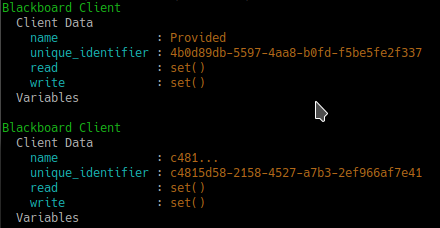
Client Instantiation
Register read/write access for keys on the blackboard. Note, registration is not initialisation.
blackboard = py_trees.blackboard.Client(name="Client")
blackboard.register_key(key="foo", access=py_trees.common.Access.WRITE)
blackboard.register_key(key="bar", access=py_trees.common.Access.READ)
blackboard.foo = "foo"
print(blackboard)
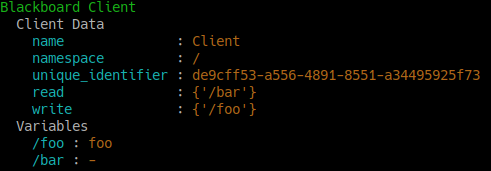
Variable Read/Write Registration
Keys and clients can make use of namespaces, designed by the ‘/’ char. Most methods permit a flexible expression of either relative or absolute names.
blackboard = py_trees.blackboard.Client(name="Global")
parameters = py_trees.blackboard.Client(name="Parameters", namespace="parameters")

blackboard.register_key(key="foo", access=py_trees.common.Access.WRITE)
blackboard.register_key(key="/bar", access=py_trees.common.Access.WRITE)
blackboard.register_key(key="/parameters/default_speed", access=py_trees.common.Access.WRITE)
parameters.register_key(key="aggressive_speed", access=py_trees.common.Access.WRITE)

blackboard.foo = "foo"
blackboard.bar = "bar"
blackboard.parameters.default_speed = 20.0
parameters.aggressive_speed = 60.0

miss_daisy = blackboard.parameters.default_speed
van_diesel = parameters.aggressive_speed

print(blackboard)
print(parameters)
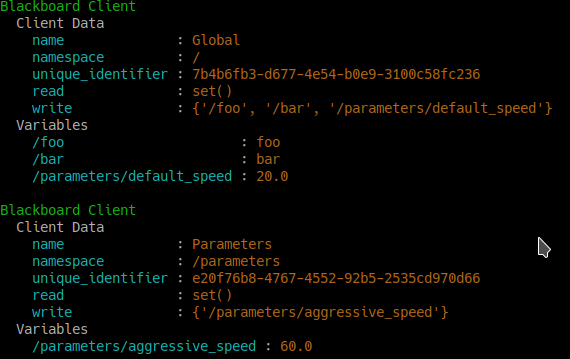
Namespaces and Namespaced Clients
Disconnected instances will discover the centralised key-value store.
def check_foo():
    blackboard = py_trees.blackboard.Client(name="Reader")
    blackboard.register_key(key="foo", access=py_trees.common.Access.READ)
    print("Foo: {}".format(blackboard.foo))


blackboard = py_trees.blackboard.Client(name="Writer")
blackboard.register_key(key="foo", access=py_trees.common.Access.WRITE)
blackboard.foo = "bar"
check_foo()
To respect an already initialised key on the blackboard:
blackboard = Client(name="Writer")
blackboard.register_key(key="foo", access=py_trees.common.Access.READ)
result = blackboard.set("foo", "bar", overwrite=False)
Store complex objects on the blackboard:
class Nested(object):
    def __init__(self):
        self.foo = None
        self.bar = None

    def __str__(self):
        return str(self.__dict__)


writer = py_trees.blackboard.Client(name="Writer")
writer.register_key(key="nested", access=py_trees.common.Access.WRITE)
reader = py_trees.blackboard.Client(name="Reader")
reader.register_key(key="nested", access=py_trees.common.Access.READ)

writer.nested = Nested()
writer.nested.foo = "I am foo"
writer.nested.bar = "I am bar"

foo = reader.nested.foo
print(writer)
print(reader)
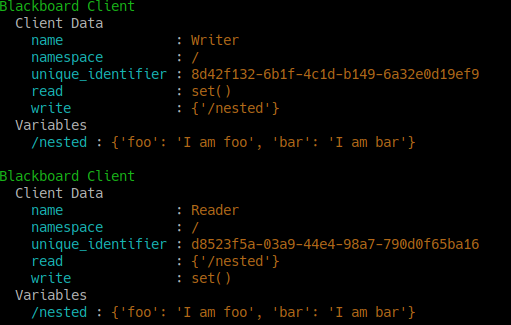
Log and display the activity stream:
py_trees.blackboard.Blackboard.enable_activity_stream(maximum_size=100)
reader = py_trees.blackboard.Client(name="Reader")
reader.register_key(key="foo", access=py_trees.common.Access.READ)
writer = py_trees.blackboard.Client(name="Writer")
writer.register_key(key="foo", access=py_trees.common.Access.WRITE)
writer.foo = "bar"
writer.foo = "foobar"
unused_result = reader.foo
print(py_trees.display.unicode_blackboard_activity_stream())
py_trees.blackboard.Blackboard.activity_stream.clear()

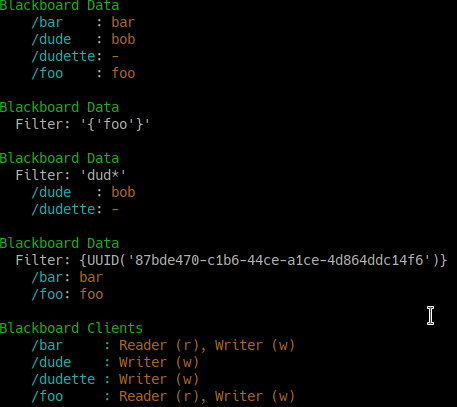
Display the blackboard on the console, or part thereof:
writer = py_trees.blackboard.Client(name="Writer")
for key in {"foo", "bar", "dude", "dudette"}:
    writer.register_key(key=key, access=py_trees.common.Access.WRITE)

reader = py_trees.blackboard.Client(name="Reader")
for key in {"foo", "bar"}:
    reader.register_key(key="key", access=py_trees.common.Access.READ)

writer.foo = "foo"
writer.bar = "bar"
writer.dude = "bob"

# all key-value pairs
print(py_trees.display.unicode_blackboard())
# various filtered views
print(py_trees.display.unicode_blackboard(key_filter={"foo"}))
print(py_trees.display.unicode_blackboard(regex_filter="dud*"))
print(py_trees.display.unicode_blackboard(client_filter={reader.unique_identifier}))
# list the clients associated with each key
print(py_trees.display.unicode_blackboard(display_only_key_metadata=True))
Behaviours are not automagically connected to the blackboard but you may manually attach one or more clients so that associations between behaviours and variables can be tracked - this is very useful for introspection and debugging.
Creating a custom behaviour with blackboard variables:
class Foo(py_trees.behaviour.Behaviour):

    def __init__(self, name):
        super().__init__(name=name)
        self.blackboard = self.attach_blackboard_client(name="Foo Global")
        self.parameters = self.attach_blackboard_client(name="Foo Params", namespace="foo_parameters_")
        self.state = self.attach_blackboard_client(name="Foo State", namespace="foo_state_")

        # create a key 'foo_parameters_init' on the blackboard
        self.parameters.register_key("init", access=py_trees.common.Access.READ)
        # create a key 'foo_state_number_of_noodles' on the blackboard
        self.state.register_key("number_of_noodles", access=py_trees.common.Access.WRITE)

    def initialise(self):
        self.state.number_of_noodles = self.parameters.init

    def update(self):
        self.state.number_of_noodles += 1
        self.feedback_message = self.state.number_of_noodles
        if self.state.number_of_noodles > 5:
            return py_trees.common.Status.SUCCESS
        else:
            return py_trees.common.Status.RUNNING


# could equivalently do directly via the Blackboard static methods if
# not interested in tracking / visualising the application configuration
configuration = py_trees.blackboard.Client(name="App Config")
configuration.register_key("foo_parameters_init", access=py_trees.common.Access.WRITE)
configuration.foo_parameters_init = 3

foo = Foo(name="The Foo")
for i in range(1, 8):
    foo.tick_once()
    print("Number of Noodles: {}".format(foo.feedback_message))
Rendering a dot graph for a behaviour tree, complete with blackboard variables:
# in code
py_trees.display.render_dot_tree(py_trees.demos.blackboard.create_root())
# command line tools
py-trees-render --with-blackboard-variables py_trees.demos.blackboard.create_root
And to demonstrate that it doesn’t become a tangled nightmare at scale, an example of a more complex tree:
Debug deeper with judicious application of the tree, blackboard and activity stream display methods around the tree tick (refer to
py_trees.visitors.DisplaySnapshotVisitorfor examplar code):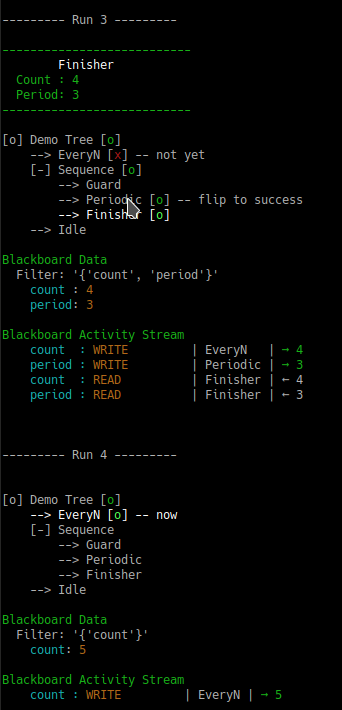
Tree level debugging
See also
- Attributes:
name (str): client’s convenient, but not necessarily unique identifier namespace (str): apply this as a prefix to any key/variable name operations unique_identifier (uuid.UUID): client’s unique identifier read (typing.Set[str]): set of absolute key names with read access write (typing.Set[str]): set of absolute key names with write access exclusive (typing.Set[str]): set of absolute key names with exclusive write access required (typing.Set[str]): set of absolute key names required to have data present remappings (typing.Dict[str, str]: client key names with blackboard remappings namespaces (typing.Set[str]: a cached list of namespaces this client accesses
- __getattr__(name: str) Any
Access variables via a convenient attribute accessor.
This is also responsible for checking permissions prior to returning the variable.
- Raises:
AttributeError: if the client does not have read access to the variable KeyError: if the variable does not yet exist on the blackboard
- __init__(*, name: str | None = None, namespace: str | None = None)
Initialise with a unique name and optionally, a namespace to operate within.
- Args:
name: client’s convenient identifier (stringifies the uuid if None) namespace: prefix to apply to key/variable name operations read: list of keys for which this client has read access write: list of keys for which this client has write access exclusive: list of keys for which this client has exclusive write access
- Raises:
TypeError: if the provided name is not of type str ValueError: if the unique identifier has already been registered
- __setattr__(name: str, value: Any) None
Set variables via a convenient attribute setter.
This is also responsible for checking permissions prior to writing.
- Raises:
AttributeError: if the client does not have write access to the variable
- __str__() str
Generate a string representation for the behaviour.
- Returns:
the string representation
- __weakref__
list of weak references to the object (if defined)
- absolute_name(key: str) str
Generate the fully qualified key name for this key.
blackboard = Client(name="FooBar", namespace="foo")
blackboard.register_key(key="bar", access=py_trees.common.Access.READ)
print("{}".format(blackboard.absolute_name("bar")))  # "/foo/bar"
- Args:
key: name of the key
- Returns:
the absolute name
- Raises:
KeyError: if the key is not registered with this client
- exists(name: str) bool
Check if the specified variable exists on the blackboard.
- Args:
name: name of the variable to get, can be nested, e.g. battery.percentage
- Raises:
AttributeError: if the client does not have read access to the variable
- get(name: str) Any
Access via method a key on the blackboard.
This is the more cumbersome method (as opposed to simply using ‘.<name>’), but useful when the name is programatically generated.
- Args:
name: name of the variable to get, can be nested, e.g. battery.percentage
- Raises:
AttributeError: if the client does not have read access to the variable KeyError: if the variable or it’s nested attributes do not yet exist on the blackboard
- id() UUID
Access the unique identifier for this client.
- Returns:
The uuid.UUID object
- is_registered(key: str, access: None | Access = None) bool
Check to see if the specified key is registered.
- Args:
key: in either relative or absolute form access: access property, if None, just checks for registration, regardless of property
- Returns:
if registered, True otherwise False
- register_key(key: str, access: Access, required: bool = False, remap_to: str | None = None) None
Register a key on the blackboard to associate with this client.
- Args:
key: key to register access: access level (read, write, exclusive write) required: if true, check key exists when calling
remap_to: remap the key to this location on the blackboard
Note the remap simply changes the storage location. From the perspective of the client, access via the specified ‘key’ remains the same.
- Raises:
- AttributeError if exclusive write access is requested, but
write access has already been given to another client
TypeError if the access argument is of incorrect type
- set(name: str, value: Any, overwrite: bool = True) bool
Set, conditionally depending on whether the variable already exists or otherwise.
This is most useful when initialising variables and multiple elements seek to do so. A good policy to adopt for your applications in these situations is a first come, first served policy. Ensure global configuration has the first opportunity followed by higher priority behaviours in the tree and so forth. Lower priority behaviours would use this to respect the pre-configured setting and at most, just validate that it is acceptable to the functionality of it’s own behaviour.
- Args:
name: name of the variable to set value: value of the variable to set overwrite: do not set if the variable already exists on the blackboard
- Returns:
success or failure (overwrite is False and variable already set)
- Raises:
AttributeError: if the client does not have write access to the variable KeyError: if the variable does not yet exist on the blackboard
- unregister(clear: bool = True) None
Unregister this blackboard client.
If requested, clear key-value pairs if this client is the last user of those variables.
- Args:
clear: remove key-values pairs from the blackboard
- unregister_all_keys(clear: bool = True) None
Unregister all keys currently registered by this blackboard client.
If requested, clear key-value pairs if this client is the last user of those variables.
- Args:
clear: remove key-values pairs from the blackboard
- unregister_key(key: str, clear: bool = True, update_namespace_cache: bool = True) None
Unegister a key associated with this client.
- Args:
key: key to unregister clear: remove key-values pairs from the blackboard update_namespace_cache: disable if you are batching
A method that batches calls to this method is
unregister_all_keys().- Raises:
KeyError if the key has not been previously registered
- unset(key: str) bool
Unset a blackboard variable.
Use to completely remove a blackboard variable (key-value pair).
- Args:
key: name of the variable to remove
- Returns:
True if the variable was removed, False if it was already absent
- verify_required_keys_exist() None
Check for existence of all keys registered as ‘required’.
Raises: KeyError if any of the required keys do not exist on the blackboard
- class py_trees.blackboard.IntermediateVariableFetcher(blackboard: Client, namespace: str)
Bases:
objectConvenient attribute accessor constrained to (possibly nested) namespaces.
- __setattr__(name: str, value: Any) None
Implement setattr(self, name, value).
- __weakref__
list of weak references to the object (if defined)
py_trees.common
Common definitions, methods and variables used by the py_trees library.
- class py_trees.common.Access(value)
Bases:
EnumUse to distinguish types of access to, e.g. variables on a blackboard.
- EXCLUSIVE_WRITE = 'EXCLUSIVE_WRITE'
Exclusive lock for writing, i.e. no other writer permitted.
- READ = 'READ'
Read access.
- WRITE = 'WRITE'
Write access, implicitly also grants read access.
- class py_trees.common.BlackBoxLevel(value)
Bases:
IntEnumA hint used for visualisation.
Whether a behaviour is a blackbox entity that may be considered collapsible (i.e. everything in its subtree will not be visualised) by visualisation tools. DETAIL.
- BIG_PICTURE = 3
A blackbox that represents a big picture part of the entire tree view.
- COMPONENT = 2
A blackbox that encapsulates a subgroup of functionalities as a single group.
- DETAIL = 1
A blackbox that encapsulates detailed activity.
- NOT_A_BLACKBOX = 4
Not a blackbox, do not ever collapse.
- class py_trees.common.ClearingPolicy(value)
Bases:
IntEnumPolicy rules for behaviours to dictate when data should be cleared/reset.
- NEVER = 3
Never clear the data
- ON_INITIALISE = 1
Clear when entering the
initialise()method.
- class py_trees.common.Duration(value)
Bases:
EnumNaming conventions.
- UNTIL_THE_BATTLE_OF_ALFREDO = 1.7976931348623157e+308
UNTIL_THE_BATTLE_OF_ALFREDOis an alias forINFINITE.
- class py_trees.common.Name(value)
Bases:
EnumNaming conventions.
- AUTO_GENERATED = 'AUTO_GENERATED'
Automagically generate (hopefully) something sensible..
- class py_trees.common.ParallelPolicy
Configurable policies for
Parallelbehaviours.- class SuccessOnAll(synchronise: bool = True)
Success depends on all children succeeding.
Return
SUCCESSonly when each and every child returnsSUCCESS. If synchronisation is requested, any children that tick withSUCCESSwill be skipped on subsequent ticks until the policy criteria is met, or one of the children returns statusFAILURE.
- class SuccessOnOne
Success depends on just one child (can be any child).
Return
SUCCESSso long as at least one child hasSUCCESSand the remainder areRUNNING
- class SuccessOnSelected(children: List[Any], synchronise: bool = True)
Success depends on an explicitly selected set of children behaviours.
Return
SUCCESSso long as each child in a specified list returnsSUCCESS. If synchronisation is requested, any children that tick withSUCCESSwill be skipped on subsequent ticks until the policy criteria is met, or one of the children returns statusFAILURE.
- class py_trees.common.Status(value)
Bases:
EnumAn enumerator representing the status of a behaviour.
- FAILURE = 'FAILURE'
Behaviour check has failed, or execution of its action finished with a failed result.
- INVALID = 'INVALID'
Behaviour is uninitialised and/or in an inactive state, i.e. not currently being ticked.
- RUNNING = 'RUNNING'
Behaviour is in the middle of executing some action, result still pending.
- SUCCESS = 'SUCCESS'
Behaviour check has passed, or execution of its action has finished with a successful result.
- class py_trees.common.VisibilityLevel(value)
Bases:
IntEnumFlag used by visualisation tools to configure visibility..
Closely associated with the
BlackBoxLevelfor a behaviour.This sets the visibility level to be used for visualisations. Visibility levels correspond to reducing levels of visibility in a visualisation.
- ALL = 0
Do not collapse any behaviour.
- BIG_PICTURE = 3
Collapse any blackbox that isn’t marked with
BIG_PICTURE.
- common.string_to_visibility_level() VisibilityLevel
Will convert a string to a visibility level.
Note that it will quietly return ALL if the string is not matched to any visibility level string identifier.
- Args:
level: visibility level as a string
- Returns:
VisibilityLevel: visibility level enum
py_trees.composites
Composites (multi-child) types for behaviour trees.
Composites are responsible for directing the path traced through the tree on a given tick (execution). They are the factories (Sequences and Parallels) and decision makers (Selectors) of a behaviour tree.
Composite behaviours typically manage children and apply some logic to the way they execute and return a result, but generally don’t do anything themselves. Perform the checks or actions you need to do in the non-composite behaviours.
Most any desired functionality can be authored with a combination of these three composites. In fact, it is precisely this feature that makes behaviour trees attractive - it breaks down complex decision making logic to just three primitive elements. It is possible and often desirable to extend this set with custom composites of your own, but think carefully before you do - in almost every case, a combination of the existing composites will serve and as a result, you will merely compound the complexity inherent in your tree logic. This this makes it confoundingly difficult to design, introspect and debug. As an example, design sessions often revolve around a sketched graph on a whiteboard. When these graphs are composed of just five elements (Selectors, Sequences, Parallels, Decorators and Behaviours), it is very easy to understand the logic at a glance. Double the number of fundamental elements and you may as well be back at the terminal parsing code.
Tip
You should never need to subclass or create new composites.
The basic operational modes of the three composites in this library are as follows:
Selector: execute a child based on cascading prioritiesSequence: execute children sequentiallyParallel: execute children concurrently
This library does provide some flexibility in how each composite is implemented without breaking the fundamental nature of each (as described above). Selectors and Sequences can be configured with or without memory (resumes or resets if children are RUNNING) and the results of a parallel can be configured to wait upon all children completing, succeed on one, all or a subset thereof.
Tip
Follow the links in each composite’s documentation to the relevant demo programs.
- class py_trees.composites.Composite(name: str, children: List[Behaviour] | None = None)
Bases:
Behaviour,ABCThe parent class to all composite behaviours.
- Args:
name (
str): the composite behaviour name children ([Behaviour]): list of children to add
- add_child(child: Behaviour) UUID
Add a child.
- Args:
child: child to add
- Raises:
TypeError: if the child is not an instance of
BehaviourRuntimeError: if the child already has a parent- Returns:
unique id of the child
- add_children(children: List[Behaviour]) Behaviour
Append a list of children to the current list.
- Args:
children ([
Behaviour]): list of children to add
- insert_child(child: Behaviour, index: int) UUID
Insert child at the specified index.
This simply directly calls the python list’s
insertmethod using the child and index arguments.- Args:
child (
Behaviour): child to insert index (int): index to insert it at- Returns:
uuid.UUID: unique id of the child
- prepend_child(child: Behaviour) UUID
Prepend the child before all other children.
- Args:
child: child to insert
- Returns:
uuid.UUID: unique id of the child
- remove_all_children() None
Remove all children. Makes sure to stop each child if necessary.
- remove_child(child: Behaviour) int
Remove the child behaviour from this composite.
- Args:
child: child to delete
- Returns:
index of the child that was removed
- remove_child_by_id(child_id: UUID) None
Remove the child with the specified id.
- Args:
child_id: unique id of the child
- Raises:
IndexError: if the child was not found
- replace_child(child: Behaviour, replacement: Behaviour) None
Replace the child behaviour with another.
- Args:
child: child to delete replacement: child to insert
- stop(new_status: Status = Status.INVALID) None
Provide common stop-level functionality for all composites.
The latter situation can arise for some composites, but more importantly, will always occur when high higher priority behaviour interrupts this one.
- Args:
new_status: behaviour will transition to this new status
- abstract tick() Iterator[Behaviour]
Tick the composite.
All composite subclasses require a re-implementation of the tick method to provide the logic for managing multiple children (
tick()merely provides default logic for when there are no children).
- tip() Behaviour | None
Recursive function to extract the last running node of the tree.
- Returns:
the tip function of the current child of this composite or None
- update() Status
Unused update method.
Composites should direct the flow, whilst behaviours do the real work.
Such flows are a consequence of how the composite interacts with it’s children. The success of behaviour trees depends on this logic being simple, well defined and limited to a few well established patterns - this is what ensures that visualising a tree enables a user to quickly grasp the decision making captured therein.
For the standard patterns, this logic is limited to the ordering of execution and logical inferences on the resulting status of the composite’s children.
This is a good guideline to adhere to (i.e. don’t reach inside children to inference on custom variables, nor reach out to the system your tree is attached to).
Implementation wise, this renders the
update()method redundant as all customisation to create a simple, well defined composite happens in thetick()method.Bottom line, composites do not make use of this method. Implementing it for subclasses of the core composites will not do anything.
- class py_trees.composites.Parallel(name: str, policy: Base, children: List[Behaviour] | None = None)
Bases:
CompositeParallels enable a kind of spooky at-a-distance concurrency.
A parallel ticks every child every time the parallel is itself ticked. The parallelism however, is merely conceptual. The children have actually been sequentially ticked, but from both the tree and the parallel’s purview, all children have been ticked at once.
The parallelism too, is not true in the sense that it kicks off multiple threads or processes to do work. Some behaviours may kick off threads or processes in the background, or connect to existing threads/processes. The behaviour itself however, merely monitors these and is itself encosced in a py_tree which only ever ticks in a single-threaded operation.
Parallels with policy
SuccessOnAllonly returnsSUCCESSif all children returnSUCCESSParallels with policy
SuccessOnOnereturnSUCCESSif at least one child returnsSUCCESSand others areRUNNINGParallels with policy
SuccessOnSelectedonly returnsSUCCESSif a specified subset of children returnSUCCESS
Policies
SuccessOnAllandSuccessOnSelectedmay be configured to be synchronised in which case children that tick withSUCCESSwill be skipped on subsequent ticks until the policy criteria is met, or one of the children returns statusFAILURE.Parallels with policy
SuccessOnSelectedwill check in both thesetup()andtick()methods to to verify the selected set of children is actually a subset of the children of this parallel.See also
- __init__(name: str, policy: Base, children: List[Behaviour] | None = None)
Initialise the behaviour with name, policy and a list of children.
- Args:
name: the composite behaviour name policy: policy for deciding success or otherwise (default: SuccessOnAll) children: list of children to add
- setup(**kwargs: int) None
Detect before ticking whether the policy configuration is invalid.
- Args:
- **kwargs (
dict): distribute arguments to this behaviour and in turn, all of it’s children
- **kwargs (
- Raises:
RuntimeError: if the parallel’s policy configuration is invalid Exception: be ready to catch if any of the children raise an exception
- stop(new_status: Status = Status.INVALID) None
Ensure that any running children are stopped.
- Args:
new_status : the composite is transitioning to this new status
- tick() Iterator[Behaviour]
Tick over the children.
- Yields:
Behaviour: a reference to itself or one of its children- Raises:
RuntimeError: if the policy configuration was invalid
- validate_policy_configuration() None
Validate the currently stored policy.
Policy configuration can be invalid if: * Policy is SuccessOnSelected and no behaviours have been specified * Policy is SuccessOnSelected and behaviours that are not children exist
- Raises:
RuntimeError: if policy configuration was invalid
- class py_trees.composites.Selector(name: str, memory: bool, children: List[Behaviour] | None = None)
Bases:
CompositeSelectors are the decision makers.
A selector executes each of its child behaviours in turn until one of them succeeds (at which point it itself returns
RUNNINGorSUCCESS, or it runs out of children at which point it itself returnsFAILURE. We usually refer to selecting children as a means of choosing between priorities. Each child and its subtree represent a decreasingly lower priority path.Note
Switching from a low -> high priority branch causes a stop(INVALID) signal to be sent to the previously executing low priority branch. This signal will percolate down that child’s own subtree. Behaviours should make sure that they catch this and destruct appropriately.
Note
If configured with memory, higher priority checks will be skipped when a child returned with running on the previous tick. i.e. once a priority is locked in, it will run to completion and can only be interrupted if the selector is interrupted by higher priorities elsewhere in the tree.
See also
The py-trees-demo-selector program demos higher priority switching under a selector.
- Args:
-
name (
str): the composite behaviour name children ([Behaviour]): list of children to add
- class py_trees.composites.Sequence(name: str, memory: bool, children: List[Behaviour] | None = None)
Bases:
CompositeSequences are the factory lines of behaviour trees.
A sequence will progressively tick over each of its children so long as each child returns
SUCCESS. If any child returnsFAILUREorRUNNINGthe sequence will halt and the parent will adopt the result of this child. If it reaches the last child, it returns with that result regardless.Note
The sequence halts once it engages with a child is RUNNING, remaining behaviours are not ticked.
Note
If configured with memory and a child returned with running on the previous tick, it will proceed directly to the running behaviour, skipping any and all preceding behaviours. With memory is useful for moving through a long running series of tasks. Without memory is useful if you want conditional guards in place preceding the work that you always want checked off.
See also
The py-trees-demo-sequence program demos a simple sequence in action.
- Args:
name: the composite behaviour name memory: if
RUNNINGon the previous tick,resume with the
RUNNINGchildchildren: list of children to add
py_trees.console
Simple colour definitions and syntax highlighting for the console.
Colour Definitions
The current list of colour definitions include:
Regular: black, red, green, yellow, blue, magenta, cyan, white,
Bold: bold, bold_black, bold_red, bold_green, bold_yellow, bold_blue, bold_magenta, bold_cyan, bold_white
These colour definitions can be used in the following way:
import py_trees.console as console
print(console.cyan + "    Name" + console.reset + ": " + console.yellow + "Dude" + console.reset)
- py_trees.console.banner(msg: str) None
Print a banner with centred text to stdout.
- Args:
msg: text to centre in the banner
- py_trees.console.colours = ['', '', '', '', '', '', '', '', '', '', '', '', '', '', '', '', '', '', '', '']
List of all available colours.
- py_trees.console.console_has_colours() bool
Detect if the console (stdout) has colourising capability.
- py_trees.console.debug(msg: str) None
Print a debug message.
- Args:
str: message to print
- py_trees.console.define_symbol_or_fallback(original: str, fallback: str, encoding: str = 'utf-8') str
Go unicode, or fallback to ascii.
Return the correct encoding according to the specified encoding. Used to make sure we get an appropriate symbol, even if the shell is merely ascii as is often the case on, e.g. Jenkins CI.
- Args:
original: the unicode string (usually just a character) fallback: the fallback ascii string encoding: the encoding to check against.
- Returns:
either original or fallback depending on whether exceptions were thrown.
- py_trees.console.error(msg: str) None
Print an error message.
- Args:
str: message to print
- py_trees.console.has_colours = False
Whether the loading program has access to colours or not.
- py_trees.console.has_unicode(encoding: str = 'utf-8') bool
Define whether the specified encoding has unicode symbols.
This is usually used to check if stdout is capable of unicode or otherwise (e.g. Jenkins CI is often be configured with unicode disabled).
- Args:
encoding: the encoding to check against.
- Returns:
true if capable, false otherwise
- py_trees.console.info(msg: str) None
Print an info message.
- Args:
str: message to print
- py_trees.console.logdebug(message: str) None
Prefixes
[DEBUG]and colours the message green.- Args:
message: message to log.
- py_trees.console.logerror(message: str) None
Prefixes
[ERROR]and colours the message red.- Args:
message: message to log.
- py_trees.console.logfatal(message: str) None
Prefixes
[FATAL]and colours the message bold red.- Args:
message: message to log.
- py_trees.console.loginfo(message: str) None
Prefixes
[ INFO]to the message.- Args:
message: message to log.
- py_trees.console.logwarn(message: str) None
Prefixes
[ WARN]and colours the message yellow.- Args:
message: message to log.
- py_trees.console.pretty_print(msg: str, colour: str = '') None
Pretty print a coloured message.
- Args:
msg: text to print colour: ascii colour to use
- py_trees.console.pretty_println(msg: str, colour: str = '') None
Pretty print a coloured message with a newline.
- Args:
msg: text to print colour: ascii colour to use
- py_trees.console.read_single_keypress() str
Wait for a single keypress on stdin.
This is a silly function to call if you need to do it a lot because it has to store stdin’s current setup, setup stdin for reading single keystrokes then read the single keystroke then revert stdin back after reading the keystroke.
- Returns:
the character of the key that was pressed
- Raises:
KeyboardInterrupt: if CTRL-C was pressed (keycode 0x03)
- py_trees.console.warning(msg: str) None
Print a warning message.
- Args:
str: message to print
py_trees.decorators
Decorate your children. They make great furniture pieces.
Decorators are behaviours that manage a single child and provide common modifications to their underlying child behaviour (e.g. inverting the result). That is, they provide a means for behaviours to wear different ‘hats’ and this combinatorially expands the capabilities of your behaviour library.

An example:
 1#!/usr/bin/env python3
 2# -*- coding: utf-8 -*-
 3
 4import py_trees.decorators
 5import py_trees.display
 6
 7if __name__ == '__main__':
 8
 9    root = py_trees.composites.Sequence(name="Life")
10    timeout = py_trees.decorators.Timeout(
11        name="Timeout",
12        child=py_trees.behaviours.Success(name="Have a Beer!")
13    )
14    failure_is_success = py_trees.decorators.Inverter(
15        name="Inverter",
16        child=py_trees.behaviours.Success(name="Busy?")
17        )
18    root.add_children([failure_is_success, timeout])
19    py_trees.display.render_dot_tree(root)
Decorators (Hats)
Decorators with specific functionality:
And the X is Y family:
Decorators for Blocking Behaviours
It is worth making a note of the effect of decorators on
blocking behaviours, i.e. those that return RUNNING
before eventually returning SUCCESS
or FAILURE.
A decorator, such as py_trees.decorators.RunningIsSuccess() on
a blocking behaviour will immediately terminate the underlying child and
re-intialise on it’s next tick. This is often surprising (to the user) but
is necessary to ensure the underlying child isn’t left in a dangling state (i.e.
RUNNING) as subsequent ticks move on to other
parts of the tree.
A better approach in this case is to build a non-blocking variant or a combination of non-blocking behaviors that handle construction, monitoring and destruction of the activity represented by the original blocking behaviour.
- class py_trees.decorators.Condition(name: str, child: Behaviour, status: Status)
Bases:
DecoratorA blocking conditional decorator.
Encapsulates a behaviour and wait for it’s status to flip to the desired state. This behaviour will tick with
RUNNINGwhile waiting andSUCCESSwhen the flip occurs.
- class py_trees.decorators.Count(name: str, child: Behaviour)
Bases:
DecoratorCount the number of times it’s child has been ticked.
This increments counters tracking the total number of times it’s child has been ticked as well as the number of times it has landed in each respective state.
It will always re-zero counters on
setup().- Attributes:
total_tick_count: number of ticks in total running_count: number of ticks resulting in this state success_count: number of ticks resulting in this state failure_count: number of ticks resulting in this state interrupt_count: number of times a higher priority has interrupted
- setup(**kwargs: int) None
Reset the counters.
- class py_trees.decorators.Decorator(name: str, child: Behaviour)
Bases:
BehaviourParent class for decorating a child/subtree with some additional logic.
- Args:
child: the child to be decorated name: the decorator name
- Raises:
TypeError: if the child is not an instance of
Behaviour
- stop(new_status: Status) None
Check if the child is running (dangling) and stop it if that is the case.
- Args:
new_status (
Status): the behaviour is transitioning to this new status
- class py_trees.decorators.EternalGuard(name: str, child: Behaviour, condition: Any, blackboard_keys: List[str] | Set[str] | None = None)
Bases:
DecoratorContinuously guard (with a condition) the execution of a child/subtree.
The eternal guard checks a condition prior to every tick of the child/subtree. If at any time the condition fails, the child/subtree is invalidated.
Note
This is stronger than a conventional guard which is only checked once before any and all ticking of what follows the guard.
- Args:
child: the child behaviour or subtree condition: a functional check that determines execution or not of the subtree blackboard_keys: provide read access for the conditional function to these keys name: the decorator name
- Examples:
Simple conditional function returning True/False:
def check():
     return True

foo = py_trees.behaviours.Foo()
eternal_guard = py_trees.decorators.EternalGuard(
    name="Eternal Guard",
    condition=check,
    child=foo
)
Simple conditional function returning SUCCESS/FAILURE:
def check():
     return py_trees.common.Status.SUCCESS

foo = py_trees.behaviours.Foo()
eternal_guard = py_trees.decorators.EternalGuard(
    name="Eternal Guard",
    condition=check,
    child=foo
)
Conditional function that makes checks against data on the blackboard (the blackboard client with pre-configured access is provided by the EternalGuard instance):
def check(blackboard):
     return blackboard.velocity > 3.0

foo = py_trees.behaviours.Foo()
eternal_guard = py_trees.decorators.EternalGuard(
    name="Eternal Guard",
    condition=check,
    blackboard_keys={"velocity"},
    child=foo
)
See also
py-trees-demo-eternal-guard for an alternative means of implementing the eternal guard concept using sequences without memory.
- class py_trees.decorators.FailureIsRunning(name: str, child: Behaviour)
Bases:
DecoratorDont stop running.
- class py_trees.decorators.FailureIsSuccess(name: str, child: Behaviour)
Bases:
DecoratorBe positive, always succeed.
- class py_trees.decorators.Inverter(name: str, child: Behaviour)
Bases:
DecoratorA decorator that inverts the result of a class’s update function.
- class py_trees.decorators.OneShot(name: str, child: Behaviour, policy: OneShotPolicy)
Bases:
DecoratorA decorator that implements the oneshot pattern.
This decorator ensures that the underlying child is ticked through to completion just once and while doing so, will return with the same status as it’s child. Thereafter it will return with the final status of the underlying child.
Completion status is determined by the policy given on construction.
With policy
ON_SUCCESSFUL_COMPLETION, the oneshot will activate only when the underlying child returnsSUCCESS(i.e. it permits retries).With policy
ON_COMPLETION, the oneshot will activate when the child returnsSUCCESS||FAILURE.
See also
- terminate(new_status: Status) None
Prevent further entry if finishing with
SUCCESS.This uses a flag to register that the behaviour has gone through to completion. In future ticks, it will block entry to the child and just return the original status result.
- class py_trees.decorators.PassThrough(name: str, child: Behaviour)
Bases:
DecoratorThis decorator simply reflects the child’s current status.
This behaviour is useful for debugging or visualisation purposes.
- class py_trees.decorators.Repeat(name: str, child: Behaviour, num_success: int)
Bases:
DecoratorRepeat.
SUCCESSisRUNNINGup to a specified number at which point this decorator returnsSUCCESS.- Args:
child: the child behaviour or subtree num_success: repeat this many times (-1 to repeat indefinitely) name: the decorator name
- initialise() None
Reset the currently registered number of successes.
- class py_trees.decorators.Retry(name: str, child: Behaviour, num_failures: int)
Bases:
DecoratorKeep trying, pastafarianism is within reach.
FAILUREisRUNNINGup to a specified number of attempts.- Args:
child: the child behaviour or subtree num_failures: maximum number of permitted failures name: the decorator name
- initialise() None
Reset the currently registered number of attempts.
- class py_trees.decorators.RunningIsFailure(name: str, child: Behaviour)
Bases:
DecoratorGot to be snappy! We want results…yesterday.
- class py_trees.decorators.RunningIsSuccess(name: str, child: Behaviour)
Bases:
DecoratorDon’t hang around…
- class py_trees.decorators.StatusToBlackboard(name: str, child: Behaviour, variable_name: str)
Bases:
DecoratorReflect the status of the decorator’s child to the blackboard.
- Args:
child: the child behaviour or subtree variable_name: name of the blackboard variable, may be nested, e.g. foo.status name: the decorator name
- class py_trees.decorators.SuccessIsFailure(name: str, child: Behaviour)
Bases:
DecoratorBe depressed, always fail.
- class py_trees.decorators.SuccessIsRunning(name: str, child: Behaviour)
Bases:
DecoratorThe tickling never ends…
- class py_trees.decorators.Timeout(name: str, child: Behaviour, duration: float = 5.0)
Bases:
DecoratorExecutes a child/subtree with a timeout.
A decorator that applies a timeout pattern to an existing behaviour. If the timeout is reached, the encapsulated behaviour’s
stop()method is called with statusFAILUREotherwise it will simply directly tick and return with the same status as that of it’s encapsulated behaviour.- initialise() None
Reset the feedback message and finish time on behaviour entry.
py_trees.display
Display utilities for the command line.
Behaviour trees are significantly easier to design, monitor and debug with visualisations. Py Trees does provide minimal assistance to render trees to various simple output formats. Currently this includes dot graphs, strings or stdout.
- py_trees.display.ascii_blackboard(key_filter: List[str] | Set[str] | None = None, regex_filter: str | None = None, client_filter: Set[UUID] | List[UUID] | None = None, keys_to_highlight: List[str] | None = None, display_only_key_metadata: bool = False, indent: int = 0) str
Graffiti your console with ascii art for your blackboard.
- Args:
key_filter: filter on a set/list of blackboard keys regex_filter: filter on a python regex str client_filter: filter on a set/list of client uuids keys_to_highlight: list of keys to highlight display_only_key_metadata: read/write access, … instead of values indent: the number of characters to indent the blackboard
- Returns:
a unicoded blackboard (i.e. in string form)
Note
registered variables that have not yet been set are marked with a ‘-’
- py_trees.display.ascii_symbols = {'behaviour': '-->', 'bold': '', 'bold_reset': '', 'decorator': '-^-', 'left_arrow': '<-', 'left_right_arrow': '<->', 'memory': 'M', 'parallel': '/_/', 'right_arrow': '->', 'selector_with_memory': '{o}', 'selector_without_memory': '[o]', 'sequence_with_memory': '{-}', 'sequence_without_memory': '[-]', 'space': ' ', 'synchronised': 's', Status.FAILURE: 'x', Status.INVALID: '-', Status.RUNNING: '*', Status.SUCCESS: 'o'}
Symbols for a non-unicode, non-escape sequence capable console.
- py_trees.display.ascii_tree(root: Behaviour, show_only_visited: bool = False, show_status: bool = False, visited: Dict[UUID, Status] | None = None, previously_visited: Dict[UUID, Status] | None = None, indent: int = 0) str
Graffiti your console with ascii art for your trees.
- Args:
root: the root of the tree, or subtree you want to show show_only_visited: show only visited behaviours show_status: always show status and feedback message (i.e. for every element, not just those visited) visited (dict): dictionary of (uuid.UUID) and status (
Status)pairs for behaviours visited on the current tick
previously_visited (dict): dictionary of behaviour id/status pairs from the previous tree tick indent: the number of characters to indent the tree
- Returns:
str: an ascii tree (i.e. in string form)
- Examples:
Use the
SnapshotVisitorandBehaviourTreeto generate snapshot information at each tick and feed that to a post tick handler that will print the traversed ascii tree complete with status and feedback messages.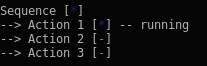
def post_tick_handler(snapshot_visitor, behaviour_tree):
    print(
        py_trees.display.unicode_tree(
            behaviour_tree.root,
            visited=snapshot_visitor.visited,
            previously_visited=snapshot_visitor.visited
        )
    )

root = py_trees.composites.Sequence(name="Sequence", memory=True)
for action in ["Action 1", "Action 2", "Action 3"]:
    b = py_trees.behaviours.StatusQueue(
        name=action,
        queue=[py_trees.common.Status.RUNNING],
        eventually = py_trees.common.Status.SUCCESS
    )
    root.add_child(b)
behaviour_tree = py_trees.trees.BehaviourTree(root)
snapshot_visitor = py_trees.visitors.SnapshotVisitor()
behaviour_tree.add_post_tick_handler(
    functools.partial(post_tick_handler,
                      snapshot_visitor))
behaviour_tree.visitors.append(snapshot_visitor)
- py_trees.display.dot_tree(root: Behaviour, visibility_level: VisibilityLevel = VisibilityLevel.DETAIL, collapse_decorators: bool = False, with_blackboard_variables: bool = False, with_qualified_names: bool = False) pydot.Dot
Paint your tree on a pydot graph.
See also
- Args:
root (
Behaviour): the root of a tree, or subtree visibility_level (optional): collapse subtrees at or under this level collapse_decorators (optional): only show the decorator (not the child), defaults to False with_blackboard_variables (optional): add nodes for the blackboard variables with_qualified_names (optional): print the class information for each behaviour in each node, defaults to False- Returns:
pydot.Dot: graph
- Examples:
# convert the pydot graph to a string object
print("{}".format(py_trees.display.dot_graph(root).to_string()))
- py_trees.display.render_dot_tree(root: Behaviour, visibility_level: VisibilityLevel = VisibilityLevel.DETAIL, collapse_decorators: bool = False, name: str | None = None, target_directory: str | None = None, with_blackboard_variables: bool = False, with_qualified_names: bool = False) Dict[str, str]
Render the dot tree to dot, svg, png. files.
By default, these are saved in the current working directory and will be named with the root behaviour name.
- Args:
root: the root of a tree, or subtree visibility_level: collapse subtrees at or under this level collapse_decorators: only show the decorator (not the child) name: name to use for the created files (defaults to the root behaviour name) target_directory: default is to use the current working directory, set this to redirect elsewhere with_blackboard_variables: add nodes for the blackboard variables with_qualified_names: print the class names of each behaviour in the dot node
- Example:
Render a simple tree to dot/svg/png file:
root = py_trees.composites.Sequence(name="Sequence", memory=True)
for job in ["Action 1", "Action 2", "Action 3"]:
    success_after_two = py_trees.behaviours.StatusQueue(
        name=job,
        queue=[py_trees.common.Status.RUNNING],
        eventually = py_trees.common.Status.SUCCESS
    )
    root.add_child(success_after_two)
py_trees.display.render_dot_tree(root)
Tip
A good practice is to provide a command line argument for optional rendering of a program so users can quickly visualise what tree the program will execute.
- py_trees.display.unicode_blackboard(key_filter: List[str] | Set[str] | None = None, regex_filter: str | None = None, client_filter: Set[UUID] | List[UUID] | None = None, keys_to_highlight: List[str] | None = None, display_only_key_metadata: bool = False, indent: int = 0) str
Graffiti your console with unicode art for your blackboard.
- Args:
key_filter: filter on a set/list of blackboard keys regex_filter: filter on a python regex str client_filter: filter on a set/list of client uuids keys_to_highlight: list of keys to highlight display_only_key_metadata: read/write access, … instead of values indent: the number of characters to indent the blackboard
- Returns:
a unicoded blackboard (i.e. in string form)
See also
Note
registered variables that have not yet been set are marked with a ‘-’
- py_trees.display.unicode_blackboard_activity_stream(activity_stream: List[ActivityItem] | None = None, indent: int = 0, show_title: bool = True) str
Pretty print the blackboard stream to console.
- Args:
activity_stream: the log of activity, if None, get the entire activity stream indent: the number of characters to indent the blackboard show_title: include the title in the output
- py_trees.display.unicode_symbols = {'behaviour': '-->', 'bold': '', 'bold_reset': '', 'decorator': '-^-', 'left_arrow': '←', 'left_right_arrow': '↔', 'memory': 'Ⓜ', 'parallel': '/_/', 'right_arrow': '→', 'selector_with_memory': '{o}', 'selector_without_memory': '[o]', 'sequence_with_memory': '{-}', 'sequence_without_memory': '[-]', 'space': ' ', 'synchronised': '⚡', Status.FAILURE: '✕', Status.INVALID: '-', Status.RUNNING: '*', Status.SUCCESS: '✓'}
Symbols for a unicode, escape sequence capable console.
- py_trees.display.unicode_tree(root: Behaviour, show_only_visited: bool = False, show_status: bool = False, visited: Dict[UUID, Status] | None = None, previously_visited: Dict[UUID, Status] | None = None, indent: int = 0) str
Graffiti your console with unicode art for your trees.
- Args:
root: the root of the tree, or subtree you want to show show_only_visited: show only visited behaviours show_status: always show status and feedback message (i.e. for every element, not just those visited) visited (dict): dictionary of (uuid.UUID) and status (
Status)pairs for behaviours visited on the current tick
previously_visited (dict): dictionary of behaviour id/status pairs from the previous tree tick indent: the number of characters to indent the tree
- Returns:
str: a unicode tree (i.e. in string form)
- py_trees.display.xhtml_symbols = {'behaviour': '<text>--></text>', 'bold': '<b>', 'bold_reset': '</b>', 'decorator': '<text>-^-</text>', 'left_arrow': '<text>←</text>', 'left_right_arrow': '<text>↔</text>', 'memory': '<text>Ⓜ</text>', 'parallel': '<text style="color:green;">/_/</text>', 'right_arrow': '<text>→</text>', 'selector_with_memory': '<text>{o}</text>', 'selector_without_memory': '<text>[o]</text>', 'sequence_with_memory': '<text>{-}</text>', 'sequence_without_memory': '<text>[-]</text>', 'space': '<text> </text>', 'synchronised': '<text>⚡</text>', Status.FAILURE: '<text style="color:red;">✕</text>', Status.INVALID: '<text style="color:darkgoldenrod;">-</text>', Status.RUNNING: '<text style="color:blue;">*</text>', Status.SUCCESS: '<text style="color:green;">✓</text>'}
Symbols for embedding in html.
- py_trees.display.xhtml_tree(root: Behaviour, show_only_visited: bool = False, show_status: bool = False, visited: Dict[UUID, Status] | None = None, previously_visited: Dict[UUID, Status] | None = None, indent: int = 0) str
Paint your tree on an xhtml snippet.
- Args:
root: the root of the tree, or subtree you want to show show_only_visited: show only visited behaviours show_status: always show status and feedback message (i.e. for every element, not just those visited) visited: dictionary of (uuid.UUID) and status
(
Status) pairs for behaviours visited on the current tickpreviously_visited: dictionary of behaviour id/status pairs from the previous tree tick indent: the number of characters to indent the tree
- Returns:
an ascii tree (i.e. as a xhtml snippet)
- Examples:
import py_trees
a = py_trees.behaviours.Success()
b = py_trees.behaviours.Success()
c = c = py_trees.composites.Sequence(name="Sequence", memory=True, children=[a, b])
c.tick_once()

f = open('testies.html', 'w')
f.write('<html><head><title>Foo</title><body>')
f.write(py_trees.display.xhtml_tree(c, show_status=True))
f.write("</body></html>")
py_trees.idioms
Creators of common subtree patterns.
- py_trees.idioms.either_or(conditions: List[ComparisonExpression], subtrees: List[Behaviour], name: str = 'Either Or', namespace: str | None = None) Behaviour
Create an idiom with selector-like qualities, but no priority concerns.
Often you need a kind of selector that doesn’t implement prioritisations, i.e. you would like different paths to be selected on a first-come, first-served basis.
task_one = py_trees.behaviours.TickCounter(name="Subtree 1", duration=2)
task_two = py_trees.behaviours.TickCounter(name="Subtree 2", duration=2)
either_or = py_trees.idioms.either_or(
    name="EitherOr",
    conditions=[
        py_trees.common.ComparisonExpression("joystick_one", "enabled", operator.eq),
        py_trees.common.ComparisonExpression("joystick_two", "enabled", operator.eq),
    ],
    subtrees=[task_one, task_two],
    namespace="either_or",
)
Up front is an XOR conditional check which locks in the result on the blackboard under the specified namespace. Locking the result in permits the conditional variables to vary in future ticks without interrupting the execution of the chosen subtree (an example of a conditional variable may be one that has registered joystick button presses).
Once the result is locked in, the relevant subtree is activated beneath the selector. The children of the selector are, from left to right, not in any order of priority since the previous xor choice has been locked in and isn’t revisited until the subtree executes to completion. Only one may be active and it cannot be interrupted by the others.
The only means of interrupting the execution is via a higher priority in the tree that this idiom is embedded in.
- Args:
conditions: list of triggers that ultimately select the subtree to enable subtrees: list of subtrees to tick from in the either_or operation name: the name to use for this idiom’s root behaviour preemptible: whether the subtrees may preempt (interrupt) each other namespace: this idiom’s private variables will be put behind this namespace
- Raises:
ValueError if the number of conditions does not match the number of subtrees
If no namespace is provided, a unique one is derived from the idiom’s name.
See also
- py_trees.idioms.oneshot(behaviour: Behaviour, name: str = 'Oneshot', variable_name: str = 'oneshot', policy: OneShotPolicy = OneShotPolicy.ON_SUCCESSFUL_COMPLETION) Behaviour
Ensure that a particular pattern is executed through to completion just once.
Thereafter it will just rebound with the completion status.
Note
Set the policy to configure the oneshot to keep trying if failing, or to abort further attempts regardless of whether it finished with status
FAILURE.- Args:
behaviour: single behaviour or composited subtree to oneshot name: the name to use for the oneshot root (selector) variable_name: name for the variable used on the blackboard, may be nested policy: execute just once regardless of success or failure, or keep trying if failing
- Returns:
Behaviour: the root of the oneshot subtree
See also
- py_trees.idioms.pick_up_where_you_left_off(name: str, tasks: List[BehaviourSubClass]) Behaviour
Create an idiom that enables a sequence of tasks to pick up where it left off.
Rudely interrupted while enjoying a sandwich, a caveman (just because they wore loincloths does not mean they were not civilised), picks up his club and fends off the sabre-tooth tiger invading his sanctum as if he were swatting away a gnat. Task accomplished, he returns to the joys of munching through the layers of his sandwich.
Note
There are alternative ways to accomplish this idiom with their pros and cons.
a) The tasks in the sequence could be replaced by a factory behaviour that dynamically checks the state of play and spins up the tasks required each time the task sequence is first entered and invalidates/deletes them when it is either finished or invalidated. That has the advantage of not requiring much of the blackboard machinery here, but disadvantage in not making visible the task sequence itself at all times (i.e. burying details under the hood).
b) A new composite which retains the index between initialisations can also achieve the same pattern with fewer blackboard shenanigans, but suffers from an increased logical complexity cost for your trees (each new composite increases decision making complexity (O(n!)).
py_trees.meta
Meta methods to create behaviours without creating behaviours themselves.
- py_trees.meta.create_behaviour_from_function(func: BehaviourUpdateMethod, module: str | None = None) Type[Behaviour]
Create a behaviour from the specified function.
This takes the specified function and drops it in to serve as the the Behaviour
update()method.The user provided fucntion must include the self argument and return a
Statusvalue.It also automatically registers a method for the
terminate()method that clears the feedback message. Other methods are left untouched.- Args:
func: a drop-in for the
update()method module: suppliment it with a __module__ name if required (otherwise it will default to ‘abc.’)
py_trees.timers
Time related behaviours.
- class py_trees.timers.Timer(name: str = 'Timer', duration: float = 5.0)
Bases:
BehaviourA simple, blocking timer behaviour running off python time.time().
This behaviour is
RUNNINGuntil the timer runs out, at which point it isSUCCESS. This can be used in a wide variety of situations - pause, duration, timeout depending on how it is wired into the tree (e.g. pause in a sequence, duration/timeout in a parallel).The timer gets reset either upon entry (
initialise()) if it hasn’t already been set and gets cleared when it either runs out, or the behaviour is interrupted by a higher priority or parent cancelling it.- Args:
name: name of the behaviour duration: length of time to run (in seconds)
- Raises:
TypeError: if the provided duration is not a real number
Note
This succeeds the first time the behaviour is ticked after the expected finishing time.
Tip
Use the
RunningIsFailure()decorator if you needFAILUREuntil the timer finishes.- __init__(name: str = 'Timer', duration: float = 5.0)
- initialise() None
Store the expected finishing time.
py_trees.trees
Tree stewardship.
While a graph of connected behaviours and composites form a tree in their own right (i.e. it can be initialised and ticked), it is usually convenient to wrap your tree in another class to take care of alot of the housework and provide some extra bells and whistles that make your tree flourish.

This package provides a default reference implementation that is directly usable, but can also be easily used as inspiration for your own tree custodians.
- class py_trees.trees.BehaviourTree(root: Behaviour)
Bases:
objectGrow, water, prune your behaviour tree with this, the tree custodian.
It features a few enhancements that go above and beyond just ticking the root behaviour of a tree. These provide richer logging, introspection and dynamic management of the tree itself:
Pre and post tick handlers to execute code automatically before and after a tick
Visitor access to the parts of the tree that were traversed in a tick
Subtree pruning and insertion operations
Continuous tick-tock support
See also
The py-trees-demo-tree-stewardship program demonstrates the above features.
- Args:
root (
Behaviour): root node of the tree- Attributes:
count: number of times the tree has been ticked. root: root node of the tree visitors: entities that visit traversed parts of the tree when it ticks pre_tick_handlers: functions that run before the entire tree is ticked post_tick_handlers: functions that run after the entire tree is ticked
- Raises:
TypeError: if root variable is not an instance of
Behaviour
- add_post_tick_handler(handler: Callable[[BehaviourTree], None]) None
Add a function to execute after the tree has ticked.
The function must have a single argument of type
BehaviourTree.Some ideas that are often used:
logging
modifications on the tree itself (e.g. closing down a plan)
sending data to visualisation tools
introspect the state of the tree to make and send reports
- Args:
handler: function
- add_pre_tick_handler(handler: Callable[[BehaviourTree], None]) None
Add a function to execute before the tree is ticked.
The function must have a single argument of type
BehaviourTree.Some ideas that are often used:
logging (to file or stdout)
modifications on the tree itself (e.g. starting a new plan)
- Args:
handler: function
- add_visitor(visitor: VisitorBase) None
Welcome a visitor.
Trees can run multiple visitors on each behaviour as they tick through a tree.
- Args:
visitor: sub-classed instance of a visitor
See also
- insert_subtree(child: Behaviour, unique_id: UUID, index: int) bool
Insert a subtree as a child of the specified parent.
If the parent is found, this directly calls the parent’s
insert_child()method using the child and index arguments.- Args:
child: subtree to insert unique_id: unique id of the parent index: insert the child at this index, pushing all children after it back one.
- Returns:
suceess or failure (parent not found) of the operation
- Raises:
TypeError: if the parent is not a
Composite
- interrupt() None
Interrupt tick-tock if it is tick-tocking.
Note that this will permit a currently executing tick to finish before interrupting the tick-tock.
- prune_subtree(unique_id: UUID) bool
Prune a subtree given the unique id of the root of the subtree.
- Args:
unique id of the subtree root
- Returns:
success or failure of the operation
- Raises:
RuntimeError: if unique id is the root or parent does not have remove_node
- replace_subtree(unique_id: UUID, subtree: Behaviour) bool
Replace the subtree with the specified id for the new subtree.
This is a common pattern where we’d like to swap out a whole sub-behaviour for another one.
- Args:
unique_id: unique id of the parent subtree: root behaviour of the subtree
- Raises
AssertionError: if unique id is the behaviour tree’s root node id
- Returns:
: suceess or failure of the operation
- setup(timeout: float | Duration = Duration.INFINITE, visitor: VisitorBase | None = None, **kwargs: int) None
Crawl across the tree calling
setup()on each behaviour.Visitors can optionally be provided to provide a node-by-node analysis on the result of each node’s
setup()before the next node’ssetup()is called. This is useful on trees with relatively long setup times to progressively report out on the current status of the operation.- Args:
timeout: time (s) to wait (use common.Duration.INFINITE to block indefinitely) visitor: runnable entities on each node after it’s setup **kwargs: distribute args to this behaviour and in turn, to it’s children
- Raises:
Exception: be ready to catch if any of the behaviours raise an exception RuntimeError: in case setup() times out
- shutdown() None
Crawl across the tree, calling
shutdown()on each behaviour.- Raises:
Exception: be ready to catch if any of the behaviours raise an exception
- tick(pre_tick_handler: Callable[[BehaviourTree], None] | None = None, post_tick_handler: Callable[[BehaviourTree], None] | None = None) None
Tick the tree just once and run any handlers before and after the tick.
This optionally accepts some one-shot handlers (c.f. those added by
add_pre_tick_handler()andadd_post_tick_handler()which will be automatically run every time).The handler functions must have a single argument of type
BehaviourTree.- Args:
pre_tick_handler (
func): function to execute before ticking post_tick_handler (func): function to execute after ticking
- tick_tock(period_ms: int, number_of_iterations: int = -1, pre_tick_handler: Callable[[BehaviourTree], None] | None = None, post_tick_handler: Callable[[BehaviourTree], None] | None = None) None
Tick continuously with period as specified.
Depending on the implementation, the period may be more or less accurate and may drift in some cases (the default implementation here merely assumes zero time in tick and sleeps for this duration of time and consequently, will drift).
This optionally accepts some handlers that will be used for the duration of this tick tock (c.f. those added by
add_pre_tick_handler()andadd_post_tick_handler()which will be automatically run every time).The handler functions must have a single argument of type
BehaviourTree.- Args:
period_ms (
float): sleep this much between ticks (milliseconds) number_of_iterations (int): number of iterations to tick-tock pre_tick_handler (func): function to execute before ticking post_tick_handler (func): function to execute after ticking
- py_trees.trees.setup(root: Behaviour, timeout: float | Duration = Duration.INFINITE, visitor: VisitorBase | None = None, **kwargs: int) None
Crawl across a (sub)tree of behaviours calling
setup()on each behaviour.Visitors can optionally be provided to provide a node-by-node analysis on the result of each node’s
setup()before the next node’ssetup()is called. This is useful on trees with relatively long setup times to progressively report out on the current status of the operation.- Args:
root: unmanaged (sub)tree root behaviour timeout: time (s) to wait (use common.Duration.INFINITE to block indefinitely) visitor: runnable entities on each node after it’s setup **kwargs: dictionary of args to distribute to all behaviours in the (sub)tree
- Raises:
Exception: be ready to catch if any of the behaviours raise an exception RuntimeError: in case setup() times out
py_trees.utilities
Assorted utility functions.
- class py_trees.utilities.Process(*args: Any, **kwargs: Any)
Bases:
ProcessConvenience wrapper around multiprocessing.Process.
- property exception: Any
Check the connection, if there is an error, reflect it as an exception.
- Returns:
The exception.
- run() None
Start the process, handle exceptions if needed.
- py_trees.utilities.get_fully_qualified_name(instance: object) str
Retrieve the fully qualified name of an object.
For example, an instance of
Sequencebecomes ‘py_trees.composites.Sequence’.- Args:
instance (
object): an instance of any class- Returns:
str: the fully qualified name
- py_trees.utilities.get_valid_filename(s: str) str
Clean up and style a string so that it can be used as a filename.
This is valid only from the perspective of the py_trees package. It does place a few extra constraints on strings to keep string handling and manipulation complexities to a minimum so that sanity prevails.
Removes leading and trailing spaces
Convert other spaces and newlines to underscores
Remove anything that is not an alphanumeric, dash, underscore, or dot
>>> utilities.get_valid_filename("john's portrait in 2004.jpg")
'johns_portrait_in_2004.jpg'
- Args:
program (
str): string to convert to a valid filename- Returns:
str: a representation of the specified string as a valid filename
- py_trees.utilities.is_primitive(incoming: Any) bool
Check if an incoming argument is a primitive type with no esoteric accessors.
That is, it has no class attributes or container style [] accessors.
- Args:
incoming: the instance to check
- Returns:
True or false, depending on the check against the reserved primitives
- py_trees.utilities.static_variables(**kwargs: Any) Callable[[C], C]
Attach initialised static variables to a python method.
@static_variables(counter=0)
def foo():
    foo.counter += 1
    print("Counter: {}".format(foo.counter))
- py_trees.utilities.truncate(original: str, length: int) str
Provide an elided (…) version of a string if it is longer than desired.
- Args:
original: string to elide length: constrain the elided string to this
- py_trees.utilities.which(program: str) str | None
Call the command line ‘which’ tool (convenience wrapper).
- Args:
program: name of the program to find.
- Returns:
path to the program or None if it doesnt exist.
py_trees.visitors
Visiting rights to behaviours.
Visitors are entities that can be passed to a tree implementation
(e.g. BehaviourTree) and used to either visit
each and every behaviour in the tree, or visit behaviours as the tree is
traversed in an executing tick. At each behaviour, the visitor
runs its own method on the behaviour to do as it wishes - logging, introspecting, etc.
Warning
Visitors should not modify the behaviours they visit.
- class py_trees.visitors.DebugVisitor
Bases:
VisitorBasePicks up and logs feedback messages and the behaviour’s status.
Logging is done with the behaviour’s logger.
- class py_trees.visitors.DisplaySnapshotVisitor(display_only_visited_behaviours: bool = False, display_blackboard: bool = False, display_activity_stream: bool = False)
Bases:
SnapshotVisitorVisit the tree, capturing the visited path, it’s changes since the last tick.
Additionally print the snapshot to console.
- Args:
display_only_visited_behaviours: useful for cropping the unvisited part of a large tree display_blackboard: print to the console the relevant part of the blackboard associated with
behaviours on the visited path
- display_activity_stream: print to the console a log of the activity on the blackboard
over the last tick
- finalise() None
Print a summary on stdout after all behaviours have been visited.
- initialise() None
Reset and initialise all variables.
- run(behaviour: Behaviour) None
Track the root of the tree and run
SnapshotVisitor.- Args:
behaviour: behaviour being visited.
- class py_trees.visitors.SnapshotVisitor
Bases:
VisitorBaseCreates a snapshot of the tree state (behaviour status’ only).
Visits the ticked part of a tree, checking off the status against the set of status results recorded in the previous tick. If there has been a change, it flags it. This is useful for determining when to trigger, e.g. logging.
- Attributes:
- changed (Bool): flagged if there is a difference in the visited path or
Statusof any behaviour on the path- visited (dict): dictionary of behaviour id (uuid.UUID) and status
(
Status) pairs from the current tick- previously_visited (dict): dictionary of behaviour id (uuid.UUID)
and status (
Status) pairs from the previous tick
running_nodes([uuid.UUID]): list of id’s for behaviours which were traversed in the current tick previously_running_nodes([uuid.UUID]): list of id’s for behaviours which were traversed in the last tick visited_blackboard_ids(typing.Set[uuid.UUID]): blackboard client id’s on the visited path visited_blackboard_keys(typing.Set[str]): blackboard variable keys on the visited path
See also
The py-trees-demo-logging program demonstrates use of this visitor to trigger logging of a tree serialisation.
- initialise() None
Store the last snapshot for comparison with the next incoming snapshot.
This should get called before a tree ticks.
- class py_trees.visitors.VisitorBase(full: bool = False)
Bases:
objectParent template for visitor types.
Visitors are primarily designed to work with
BehaviourTreebut they can be used in the same way for other tree custodian implementations.- Args:
full: flag to indicate whether it should be used to visit only traversed nodes or the entire tree
- Attributes:
full: flag to indicate whether it should be used to visit only traversed nodes or the entire tree
- finalise() None
Override if any work needs to be performed after ticks (i.e. showing data).
- initialise() None
Override if any resetting of variables needs to be performed between ticks (i.e. visitations).